🌋 WebIDE 的开发记录其八(Textmate详解)

!本篇文章过于久远,其中观点和内容可能已经不准确,请见谅!~
这篇文章分享的是更详细一步步的实现 VSCode 的 textmate,并且解释一些为什么,最后手动引入新的高亮逻辑。
PS: 上一篇相关文章:🌋 WebIDE 的开发记录其五(monaco-editor + textmate)
WorkPad 是一个非常有意思的项目,之前抱着分享思路的想法,用很简略的文章说了下重点,之后非常多的人来询问 Textmate、LSP 等问题,后面用几篇文章再多说一些。本文为第八篇文章,更详细深入谈谈 Textmate 的高亮和扩展。
需要先明确的几个问题:
- 高亮的本质是什么?对文本中的变量、注释、字符串、函数、保留关键字等进行不同的样式着色。
- 不同的高亮的区别是什么?词法、语法分析逻辑不同,同样一个字符串被不同的语法器分析出来是函数还是变量可能不同,有些用纯正则来匹配,有些增加了逻辑之类的,有些只能一行一行匹配,有些能多行匹配,有些支持嵌套,有些不支持,解析出来的结果也各成体系,其中使用最广泛通用的就是
textmate。 - 高亮为什么和语法解析有关系?一般来说语法分析器能分析出不同的 token,这个 token 就是抽象出来与语言无关的标记,比如:关键字、注释、字符串等,每个 token 有不同的着色逻辑,颜色、背景、斜体、粗细等。PS: 这个和最近样式库中很火的
Design Tokens概念本质上是一个意思,都是统一预设的基础样式标记。monaco 自带默认的 token 解析器解析出:identifier operators keywordconstant entity taginfo-token warn-token error-tokendebug-token regexp attributeconstructor namespace typepredefined invalidstring .[escape]comment .[doc]delimiter .[curly, square, parenthesis, angle, array, bracket]number .[hex, octal, binary, float]variable .[name, value]meta .[content]monaco 自带主题定义 token 的样式:// 定义 theme 的方法monaco.editor.defineTheme('myCustomTheme', {base: 'vs', // can also be vs-dark or hc-blackinherit: true, // can also be false to completely replace the builtin rulesrules: [{ token: 'comment', foreground: 'ffa500', fontStyle: 'italic underline' },{ token: 'comment.js', foreground: '008800', fontStyle: 'bold' },{ token: 'comment.css', foreground: '0000ff' } // will inherit fontStyle from `comment` above],colors: {'editor.foreground': '#000000'}}); - 为什么 monaco 能够使用不同的语法?monaco 虽然内置的是固定的一个 token 解析器
Monarch,但是仍然向外提供了monaco.languages.setTokensProvider让外界定义 token,主题部分也并没有限制 token 的集合,所以也让我们移植 textmate 语法和主题成为可能。也就是可以让我们解析出 token,也可以让我们自定义 token 的样式,虽然很有限但是够用。
是什么、为什么需要、以及扮演了什么角色?
TextMate 语法使用正则表达式解析 token,但是 js 的正则引擎与 textmate 所使用的 oniguruma 不同,有很多特性差异(JS 不支持 textmate 中使用很多的后行断言 lookbehind),为了一致性和功能完整等原因,有必要使用原版的 oniguruma 模块来实现正则表达式解析。
但是 oniguruma 是个 c++ 模块,在各种跨平台的客户端中没问题,但是 js 环境中只能用 wasm 来退而求其次了,具体历史什么的可以看之前的文章。
抽象出来的一个 textmate 运行逻辑,负责加载、运行、管理 textmate 的解析。
// 非常简略的加载和运行逻辑部分(官方使用 demo 演示)const { loadWASM, createOnigScanner, createOnigString } = require('vscode-oniguruma')// oniguruma 的加载和封装const wasmBin = fs.readFileSync('path/onig.wasm')).buffer;const vscodeOnigurumaLib = loadWASM(wasmBin).then(() => ({createOnigScanner,createOnigString}));// -> source.js 是 textmate 中 js 的 scopeName,算是唯一标识 idconst vsctm = require('vscode-textmate');// 创建 textmate 的注册机来管理整个的语法加载和解析const registry = new vsctm.Registry({onigLib: vscodeOnigurumaLib,loadGrammar: (scopeName) => {if (scopeName === 'source.js') {// https://github.com/textmate/javascript.tmbundle/blob/master/Syntaxes/JavaScript.plistreturn readFile('./JavaScript.plist').then(data => vsctm.parseRawGrammar(data.toString()))}console.log(`Unknown scope name: ${scopeName}`);return null;}});// 加载 js 的语法文件并解析await registry.loadGrammar('source.js')// 解析细节const text = [`function sayHello(name) {`,`\treturn "Hello, " + name;`,`}`];let ruleStack = vsctm.INITIAL;for (let i = 0; i < text.length; i++) {const line = text[i];const lineTokens = grammar.tokenizeLine(line, ruleStack);console.log(`\nTokenizing line: ${line}`);for (let j = 0; j < lineTokens.tokens.length; j++) {const token = lineTokens.tokens[j];console.log(` - token from ${token.startIndex} to ${token.endIndex} ` +`(${line.substring(token.startIndex, token.endIndex)}) ` +`with scopes ${token.scopes.join(', ')}`);}ruleStack = lineTokens.ruleStack;}// 输出每一行的每个关键逻辑的 token 结果
上面这两个部分是 monaco-editor 能够实现 textmate 的关键
- 虽然有很多成熟的在线编辑器都做过了,上一篇文章前人栽树环节也说了非常多,基本上是
vscode-textmate+oniguruma这两个依赖的组合或魔改,vscode 目前用的是vscode-textmate+vscode-oniguruma。 vscode-textmate版本已经迭代了很多版本,但是5.0的版本引入了oniguruma的一些breaking change导致之前的逻辑没法直接用了,所以我们需要手动引入4.x版本。vscode-textmate在安装老版本的时候容易出现问题,可以直接到 github 上下载对应的 release 放到项目中,毕竟这个东西也没办法升级,我们还不得不用的。onigasm和vscode-oniguruma本质上是同一个东西,都是从 C++ 编译过来的,都是 wasm,都是要替换atom的node-oniguruma,所以 API 基本相同,负责正则的输入输出。vscode的逻辑迭代增加了很多的功能,如果想要完全复刻,可以去翻源码。但是我这边因为之前参考的是 theia 的很多逻辑,相当于 vscode 的旧逻辑,包括主题文件、语法文件、textmate解析逻辑等都可能不是最新的,所以如果同时参考 vscode 和 theia 或者这篇文章,其中有可能和预期不太相符。vscode-textmate@4.4.0+onigasm@2.2.5+vscode:dark_plus这三个组合
之前做 WorkPad 项目的时候积攒的可运行代码,当时参考的是 theia 项目,大部分逻辑仍然能在 theia 的项目中找到。
不过即使说的再怎么简单,但也不至于两行代码能解决的,从流程上说看,还是要处理很多的转换才能跑通整个逻辑。
下面的流程也是我做新博客的时候,想要做 mdx 语法编辑器的过程。其中用到的资源基本上都是 vscode 官方的,所以最后样式和 vscode 一定也是一样的。
整个代码算是不缺什么,但是和我在项目中实际使用的少了很多抽象,估计也没办法直接运行,但是关键的代码都在,比之前的文章也细致的多。如果交流的人多的话再考虑开源出来。
这里使用
monaco-editor-core 而不是 monaco-editor,因为语法部分我们需要重写,不需要自带的那些 worker 等用不到的逻辑所以 core 就够了。monaco 的加载取决于各种编译环境对依赖的加载,webpack、webpack-based、parcel、vite 等,不过好在 monaco 同时支持 esm、amd,加载方案可以很灵活。(推荐通过 AMD 来加载,代码中引用 import * as monaco from "monaco-editor/esm/vs/editor/editor.api" 作为类型声明)我们使用
AMD 避免把这么大一个包打到 bundle 里面,节省了编译的依赖、编译时间等,此外用外部 CDN 也更灵活,你可以把这个替换成自己的资源。const loaderConfig = {paths: {vs: "https://cdn.jsdelivr.net/npm/monaco-editor-core@0.30.1/min/vs"}};export function monacoLoader(): Promise<Monaco> {return new Promise<Monaco>((resolve, reject) => {const script = document.createElement("script");script.src = `${loaderConfig.paths.vs}/loader.js`;script.onload = () => configureLoader(resolve, reject);script.onerror = reject;document.body.appendChild(script);});}function configureLoader(resolve: (monaco: Monaco) => void, reject: Function) {window.require.config(loaderConfig);window.require(["vs/editor/editor.main"], resolve, reject);}export default monacoLoader;
const monaco = await monacoLoader();(window as any).monaco = monaco;const defaultModel = monaco.editor.createModel(`# Head1\n\nHello World.`,"markdown",monaco.Uri.parse("file:///index.md"));const editor = monaco.editor.create(containerRef.current,{model: defaultModel,automaticLayout: true},{});
就像上面说的,只是一个正则的输入输出
import { loadWASM, OnigScanner, OnigString } from "onigasm";const onigasmPath = "https://cdn.jsdelivr.net/npm/onigasm@2.2.5/lib/onigasm.wasm";// onigasm 加载器onigasmPromise = fetch(onigasmPath, { cache: "force-cache" }).then(res => res.arrayBuffer()).then(buffer => loadWASM(buffer)).then(() => new OnigasmLib());export class OnigasmLib implements IOnigLib {createOnigScanner(sources: string[]) => new OnigScanner(sources)createOnigString(sources: string) => new OnigString(sources)}
主题这个事情就比较搞笑了,vscode 的主题 json、monaco-editor 的主题、textmate 需要的主题,这三个的数据结构是不完全相同的。
vscode-textmate 虽然采用了 textmate 的主题,但是也并没有在自定义一套样式,仍然采用了 monaco-editor 自己的着色主题规则,所以 vscode-textmate 采用 textmate 语法和 rule 等,最后生成对应 token 的时候颜色还是使用的是 moanco 的 theme 的颜色。所以必须要有个转换逻辑,把 vscode 的主题转成
IRawTheme 给 textmate,还要转成 IStandaloneThemeData 给 monaco 才能让两边都能统一样式,token 和 rule/settings 样式对应起来。好在 vscode 的主题和 textmate 的差不多,monaco 的主题
vscode-textmate 也已经给我们封装好了色表。vscode 内置主题中 vs-dark-plus 一般用的比较多,可以在这里找到源文件: dark-plus
{ // vscode theme json 节选"$schema": "vscode://schemas/color-theme","name": "Dark+ (default dark)","include": "./dark_vs.json","tokenColors": [{"name": "Function declarations","scope": ["entity.name.function",//...],"settings": { "foreground": "#DCDCAA" }},//...]}
textmate 需要的
IRawTheme 长这样:/*** A single theme setting.*/export interface IRawThemeSetting {readonly name?: string;readonly scope?: string | string[];readonly settings: {readonly fontStyle?: string;readonly foreground?: string;readonly background?: string;};}/*** A TextMate theme.*/export interface IRawTheme {readonly name?: string;readonly settings: IRawThemeSetting[];}
monaco-editor 支持的 theme 长这样,最主要的是
encodedTokensColors 的一个颜色数组没有展示在这:monaco.editor.defineTheme('myCustomTheme', {base: 'vs', // can also be vs-dark or hc-blackinherit: true, // can also be false to completely replace the builtin rulesrules: [{ token: 'comment', foreground: 'ffa500', fontStyle: 'italic underline' },{ token: 'comment.js', foreground: '008800', fontStyle: 'bold' },{ token: 'comment.css', foreground: '0000ff' } // will inherit fontStyle from `comment` above],colors: {'editor.foreground': '#000000'}});
下面的逻辑中包含了主题的 include 引用,颜色转换等,把 vscode 的 json 主题转换为 textmate 和 monaco-editor 分别的主题类型,可以给到语法解析和主题应用:
import { IStandaloneThemeData, BuiltinTheme, ITokenThemeRule } from "../editor.d";import { IRawTheme, IRawThemeSetting, Registry } from "./vscode-textmate/main";export type VSCTheme = {colors: { [i: string]: string };tokenColors: IRawThemeSetting[];include?: string;};type Includes = { [i: string]: VSCTheme };export type ThemeMix = {name: string;textmateTheme: IRawTheme;monacoTheme: IStandaloneThemeData;};export class MonacoThemeRegistry {protected themes = new Map<string, ThemeMix>();public getRawTheme = (name: string) => this.themes.get(name)?.textmateTheme;public getMonacoTheme = (name: string) => this.themes.get(name)?.monacoTheme;mergedVSCTheme = (json: VSCTheme, includes?: Includes): VSCTheme => {const after: VSCTheme = {colors: json.colors,tokenColors: json.tokenColors,};if (json.include && includes && includes[json.include]) {const parent = this.mergedVSCTheme(includes[json.include], includes);after.colors = { ...(parent.colors || {}), ...after.colors };after.tokenColors = [...(parent.tokenColors || []), ...after.tokenColors];}return after;};genTextmateTheme = (vsctheme: VSCTheme) => {return { settings: [...vsctheme.tokenColors] };};genMonacoTheme = (vsctheme: VSCTheme,textmateTheme: IRawTheme,monacoBase: BuiltinTheme = "vs-dark") => {const monacoTheme: IStandaloneThemeData = {base: monacoBase || "vs",inherit: true,rules: [], // token 和样式对应规则colors: {}, // 主要是编辑器最普适的颜色表,前景背景之类encodedTokensColors: [], // 编码后的颜色规则,就是 css 中的 mtk1 之类};// 默认的编辑器颜色,对应背景、前景、选择、高亮等等一般规则if (vsctheme.colors) Object.assign(monacoTheme.colors, vsctheme.colors);// 把 textmate 的 IRawThemeSetting 转为 monaco 的 ITokenThemeRulefor (const setting of vsctheme.tokenColors)this.transform(setting, (rule) => monacoTheme.rules.push(rule));// 后面就是提取 encodedTokensColors 来实现真实的 monaco 着色// 这里必须使用 4.x 的代码,不然这里会出现类型问题const reg = new Registry();reg.setTheme(textmateTheme);monacoTheme.encodedTokensColors = reg.getColorMap();// index 0 has to be set to null for monacomonacoTheme.encodedTokensColors[0] = null!;// index 1 and 2 are the default colorsconst foreColor = monacoTheme.colors["editor.foreground"];if (foreColor) monacoTheme.encodedTokensColors[1] = foreColor;const backColor = monacoTheme.colors["editor.background"];if (backColor) monacoTheme.encodedTokensColors[2] = backColor;return monacoTheme;};public register(givenName: string,vsc: VSCTheme,monacoBase: BuiltinTheme = "vs-dark"): ThemeMix {if (this.themes.has(givenName)) return this.themes.get(givenName)!;const textmateTheme = this.genTextmateTheme(vsc);const monacoTheme = this.genMonacoTheme(vsc, textmateTheme, monacoBase);const result: ThemeMix = {name: givenName,textmateTheme: this.genTextmateTheme(vsc),monacoTheme: this.genMonacoTheme(vsc, textmateTheme, monacoBase),};this.themes.set(givenName, result);monaco.editor.defineTheme(givenName, monacoTheme);return result;}protected transform(setting: any,acceptor: (rule: ITokenThemeRule) => void): void {if (typeof setting.scope === "undefined") setting.scope = [""];if (typeof setting.scope === "string") setting.scope = [setting.scope];for (const scope of setting.scope) {const settings = Object.keys(setting.settings).reduce((previous: { [key: string]: string }, current) => {let value = setting.settings[current];if (typeof value === "string")value = value.replace(/^\#/, "").slice(0, 6);previous[current] = value;return previous;},{});acceptor({ ...settings, token: scope });}}}export const monacoThemeRegistry = new MonacoThemeRegistry();const darkPlus = monacoThemeRegistry.mergedVSCTheme(require("./theme/vscode/dark_plus.json"),{"./dark_defaults.json": require("./theme/vscode/dark_defaults.json"),"./dark_vs.json": require("./theme/vscode/dark_vs.json"),});export const DARK_DEFAULT_THEME = monacoThemeRegistry.register("dark-plus",darkPlus,"vs-dark");
这块是最复杂的,涉及到的逻辑很多,不过也算是最简单的,因为都已经被封装好了。
编辑器一般情况下都需要加载非常多的语法,比如ts、css、html等,需要抽象出来的统一配置、加载等,可以叫做provider、registery等概念,这里先忽略,以一个语言为例子,多语言的封装可以自己搞。
textmate 的语法是有规范标准的,VSCode 的项目仓库中直接通过脚本转化为了 json 格式的统一格式,可以到 VSCode 的
markdown 语法文件中查看 markdown-basics 的定义。主要是三个文件(语法定义、编辑行为、语言定义):
根据上面获得的配置,向 monaco 增加语言定义和配置:
const languageId = 'markdown'monaco.languages.register({id: languageId,extensions: [".md", ".markdown", ".mdown", ".mkdn", ".mkd", ".mdwn", ".mdtxt", ".mdtext"],aliases: ["Markdown", "markdown"]});
以上是在 monaco 中定义了语言和语言的配置,语法部分下面继续:
import { Registry, IRawGrammar, parseRawGrammar } from "./vscode-textmate/main";const mdScopeName = "text.html.markdown"// 初始化一个注册器,整个语法支持的核心grammarRegistry = new Registry({getOnigLib: () => onigasmPromise,theme: DARK_DEFAULT_THEME.textmateTheme,loadGrammar: async (scopeName: string) => {if(scopeName === "text.html.markdown") {return await fetch('./markdown.tmLanguage.json', { cache: "force-cache" }).then(res => res.json())}return undefined;},});
好像这个语法部分逻辑和 monaco 没什么关系,那是因为我们还没有和 monaco 连在一起,所以现在肯定没法起作用。
这只是一个语言的应用,如果应用数十个的话,还是需要一个统一的语言注册机制类似的东西方便引用
用
monaco.editor.setTokensProvider 来链接 monaco 和 textmate:import { INITIAL, StackElement, IGrammar } from "./vscode-textmate/main";export class TokenizerState implements IState {constructor(public readonly ruleStack: StackElement) {}clone = (): IState => new TokenizerState(this.ruleStack)equals = (other: IState): boolean => (other instanceof TokenizerState &&(other === this || other.ruleStack === this.ruleStack))}// 激活语言支持const _activatedLanguages = new Set<string>();const activateLanguage = async (languageId: string): Promise<void> => {// 获取语言配置/*{"comments": { "blockComment": ["<!--", "-->"] },// symbols used as brackets"brackets": [["{", "}"], ["[", "]"], ["(", ")"]],// symbols that are auto closed when typing"autoClosingPairs": [["{", "}"], // ---> 需要手动转为 open、close 的形式{"open": "\"","close": "\"","notIn": ["string"]},// ...],// symbols that that can be used to surround a selection"surroundingPairs": [["{", "}"],// ...],"folding": {// ...}}*/const configuration = await fetch('./language-configuration.json').then(res => res.json())// 转换部分配置(重要)raw.autoClosingPairs = raw.autoClosingPairs.map((pair: any) => {if (Array.isArray(pair)) return { open: pair[0], close: pair[1] };return pair;});monaco.languages.setLanguageConfiguration(languageId, configuration);// grammer 部分/*{"language": "markdown","scopeName": "text.html.markdown",// 这里是引用的 IRawGrammar 文件"path": "./syntaxes/markdown.tmLanguage.json",// 这里是 IGrammarConfiguration 配置"embeddedLanguages": {"meta.embedded.block.html": "html","source.js": "javascript","source.css": "css",}}*/// 根据之前注册的语言获得语言 id(number)const encodedLanguageId = monaco.languages.getEncodedLanguageId(languageId);// 转换部分配置(重要)if (tmConfig) {const embeddedLanguages = tmConfig.embeddedLanguages || {};for (const key in embeddedLanguages) {if (Object.prototype.hasOwnProperty.call(embeddedLanguages, key)) {const lang = embeddedLanguages[key];embeddedLanguages[key] = monaco.languages.getEncodedLanguageId(lang);if (embeddedLanguages[key] === 0) delete embeddedLanguages[key];}}tmConfig.embeddedLanguages = embeddedLanguages;}const grammar = await grammarRegistry.loadGrammarWithConfiguration(mdScopeName,encodedLanguageId,tmConfig);monaco.languages.setTokensProvider(languageId,{getInitialState: () => new TokenizerState(INITIAL),tokenizeEncoded(line: string, state: TokenizerState): IEncodedLineTokens {// console.log('unencoded token for debug', line);// console.log(grammar.tokenizeLine(line, state.ruleStack));const result = grammar.tokenizeLine2(line, state.ruleStack);return {endState: new TokenizerState(result.ruleStack),tokens: result.tokens};}});console.info("开启语言 " + languageId + "支持");};activateLanguage(languageId)
以上就是全部的 textmate 应用,因为迭代的发展,和目前 vscode 的使用不太一致了,但是仍然能够得到我们需要的效果。
上面提了一个
markdown 的语法 markdown-basics,相同目录下还有四十多个其他内置的语法项目。详细查看的话里面也说明了是在源项目的 tmLanguage 转换过来的:
This file has been converted from https://github.com/textmate/yaml.tmbundle/blob/master/Syntaxes/YAML.tmLanguage If you want to provide a fix or improvement, please create a pull request against the original repository. Once accepted there, we are happy to receive an update request.
我们能够一下子获取到这些语法规则:
bat, clojure, coffeescript, cpp, csharp, css, dart, diff, docker, fsharp, go, groovy, handlebars, hlsl, html, ini, ipynb, java, javascript, json, julia, latex, less, log, lua, make, markdown-basics, markdown-math, objective-c, perl, php, powershell, pug, python, r, razor, ruby, rust, scss, shaderlab, shellscript, sql, swift, typescript-basics, vb, xml, yaml
和上面的语法逻辑相同,我们需要的东西有:
monaco.languages.ILanguageExtensionPoint、monaco.editor.LanguageConfiguration、IRawGrammar、IGrammarConfiguration 这四个东西在 package.json 中都能看到。以 bat 为例:{"contributes": {"languages": [{// 这里是引用的 monaco.languages.ILanguageExtensionPoint 文件"id": "markdown","aliases": ["Markdown", "markdown"],"extensions": [".md", ".markdown", /*...*/],// 这里是引用的 monaco.editor.LanguageConfiguration 文件"configuration": "./language-configuration.json"}],"grammars": [{"language": "markdown","scopeName": "text.html.markdown",// 这里是引用的 IRawGrammar 文件"path": "./syntaxes/markdown.tmLanguage.json",// 这里是 IGrammarConfiguration 配置(需要将字符串的 language 转为数字id的 monaco.languages.getEncodedLanguageId(lang))"embeddedLanguages": {"meta.embedded.block.html": "html","source.js": "javascript","source.css": "css",}}],},}
其他语法文件基本上都是这个配置结构,所以我们把全部语言文件夹拷到自己的项目中,然后整合一下:
import { IGrammarConfiguration } from "./textmate/vscode-textmate/main";type GrammarPkg = {contributes: {languages: {id: string;extensions: string[];aliases: string[];configuration: string;}[];grammars: ({language: string;scopeName: string;path: string;} & IGrammarConfiguration)[];};};export type GrammarInfo = {id: string;languageId: string;scopeName: string;language?: {id: string;extensions: string[];aliases: string[];};tmConfig?: IGrammarConfiguration;tmPath: string;configurationPath: string;};const basePath = "/libs/grammars";const grammarsPath: string[] = ["bat","clojure","coffeescript","cpp","csharp","css",// ...];const fixPath = (s: string) => s.replace(/\.\//, "");// 不严格的 json 解析防止某些语法文件有注释、多个逗号之类的问题const easyJsonDec = async (str: string) => new Function(`return ${str}`)();export const loadRawJson = async (path: string) => {return await fetch(path, { cache: "force-cache" }).then((res) => res.text()).then((str) => easyJsonDec(str));};export const prepareGrammars = async () => {// 异步加载的形式,可以改成打包、预渲染、预处理等提前合并的手段避免这么多网络请求const grammarsPkgs: GrammarPkg[] = await Promise.all<GrammarPkg>(grammarsPath.map((p) =>fetch(`${basePath}/${p}/package.json`, { cache: "force-cache" }).then((res) => res.json())));const grammarsOutput: GrammarInfo[] = [];grammarsPkgs.forEach(async (grammar, i) => {const folder = `${basePath}/${grammarsPath[i]}`;const { grammars, languages } = grammar.contributes;grammars.forEach(async (grammarConf) => {const tm = grammars.find((g) => g.scopeName == grammarConf.scopeName)!;let language =languages.length == 1? languages[0]: languages.find((g) => g.id == tm.language);if (!language || !language.configuration) return;grammarsOutput.push({id: grammarConf.scopeName,languageId: language.id,scopeName: tm.scopeName,language,tmConfig: tm,tmPath: `${folder}/${fixPath(tm.path)}`,configurationPath: `${folder}/${fixPath(language.configuration)}`,});});});return grammarsOutput;};
以上我们就完整的引入了全部的语言的注册信息,包括语法和语法配置的文件位置,可以在之前的加载逻辑中直接引用。
这篇文章的诞生也是因为我想要脱离之前的 workpad 实现一个轻量的编辑器来实现
mdx,之前没有添加这个语言,所以这里需要新增。- 在 vscode 中找到响应的语法扩展
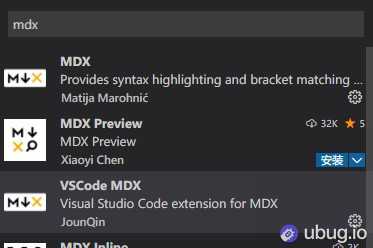
- 在语法扩展中找到仓库地址,一般都是开源的
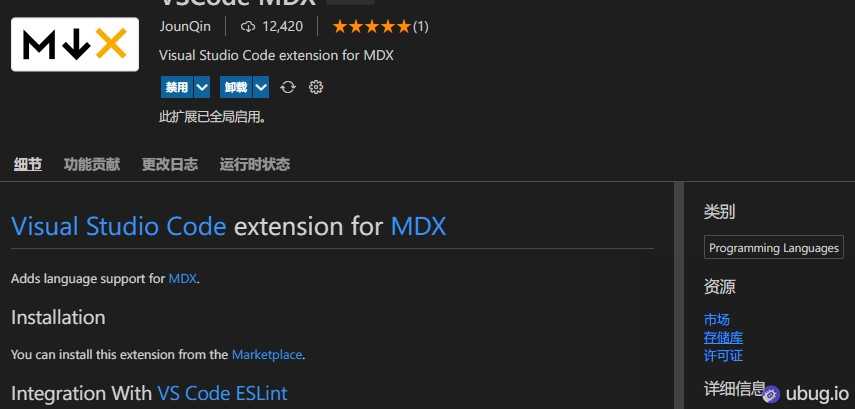
- 找到类似文件目录的开源项目,放到之前那些语法项目旁边,引入进来就行了。
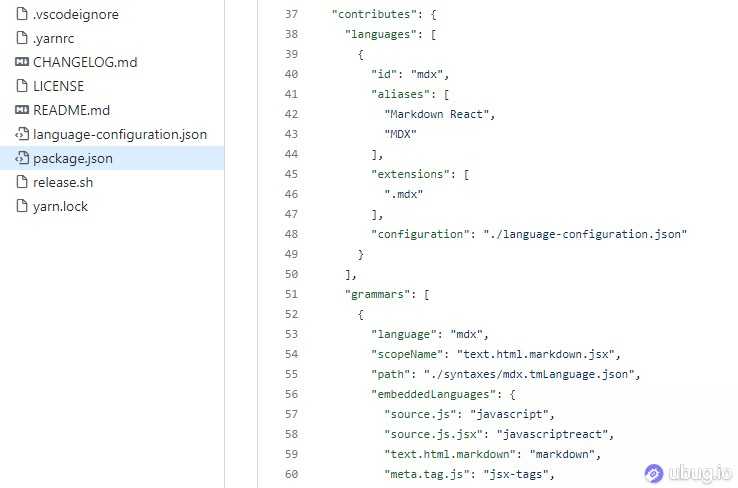
so easy...
我之前做的一大堆语言使用的并不是 vscode 的,然后引用vscode的语法项目进来后死活没办法渲染出来,结果发现语法并不是严格唯一的,比如 js 的高亮语法 scope 有些叫source.jsx,有些却叫source.js.jsx,这样就会导致语言引用的missmatch。
感谢您的阅读,本文由 Ubug 版权所有。如若转载,请注明出处:Ubug(https://ubug.io/blog/workpad-part-8)